 |
Tilt Five NDK
|


|
|
Tilt Five NDK
|
|
The following files need to be included in your project
| File(s) | Purpose |
|---|---|
.hpp & .h files from the include directory | C and C++ header files for the API |
One of the libraries from lib directory | The Tilt Five NDK support library |
Most of the operations performed with the glasses are not done directly by the client, but are performed by the Tilt Five™ service on behalf of the client.
The connection to the service is not guaranteed to always be available. Scenarios where the service is unavailable include:
A trivial example of handling this is shown below:
To avoid using exceptions, most C++ functions return the tiltfive::Result type.
This class wraps the 'real' return type and adds additional error conditions. tiltfive::Result is truthy, so you should first check if the result is valid before using it, after that you dereference the tiltfive::Result to get the 'real' value.
An example of this is shown below:
Depending on the level of access required to the API, there are one or more setup steps. Details are shown below with example code. Further details of the API are here documented in the Tilt Five™ Native Interface (C++).
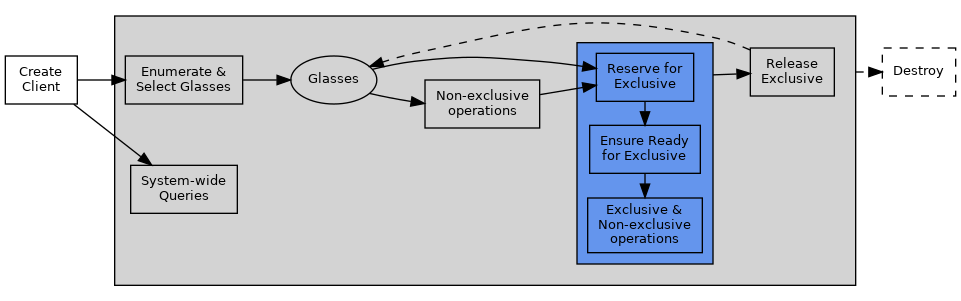
System-wide queries require nothing more than a client to perform. Most of these operations are querying the service for common parameters such as the service version (tiltfive::Client::getServiceVersion()) and fixed physical parameters (tiltfive::Client::getGameboardSize()).
Some glasses operations are available without acquiring exclusive access. These include operations to query stored parameters about glasses such as the IPD (tiltfive::Glasses::getIpd()) and user specified friendly name (tiltfive::Glasses::getFriendlyName()). Additionally, accessing the Wand Stream 'wand stream' does not require an exclusive connection.
Other operations require exclusive access before a client can perform them. Only one client can have exclusive access to glasses at a time. Principally, obtaining the current pose (tiltfive::Glasses::getLatestGlassesPose()) and sending frames for rendering (tiltfive::Glasses::sendFrame()) require exclusive access.
Essentially, this is a process of repeatedly calling tiltfive::Glasses::reserve() until the function returns success. This can succeed even if glasses are not fully available (for example due to rebooting). Once the glasses are reserved, then it is time to ensure the glasses are ready for exclusive operations.
After a pair of glasses has been reserved, they need to be made fully ready for exclusive operations (e.g., getting the current glasses pose and sending frames) using tiltfive::Glasses::ensureReady() . This may return an error that retry is needed if the glasses are not yet ready. Upon success, the glasses are ready for exclusive operations.
To automate the "reserve and ensure ready" process, use the GlassesConnectionHelper.
Once an exclusive connection has been established, you may perform exclusive operations such as tiltfive::Glasses::getLatestGlassesPose() and tiltfive::Glasses::sendFrame().
At any point after glasses have been reserved for exclusive use by a client, they can be released so that another client can reserve them exclusively instead without needing to destroy the whole glasses object or context. Use tiltfive::Glasses::release() to restore availability to other clients.
tiltfive::Client objects that fall out of scope automatically clean up their own resources. Likewise, tiltfive::Glasses that fall out of scope have their resources release. No explicit release is required in either case.
Note that objects in the C++ binder maintain internal references as necessary. Therefore, even if you no longer have a reference to a tiltfive::Client for example, but do still have a reference tiltfive::Glasses the client will not be released until the glasses object goes out of scope. For further details see Object References below.
Information about wand events is not delivered separately for each connected wand, but is instead multiplexed into a glasses global stream. Stream events are one of the following (T5_WandStreamEventType):
| Event | Meaning |
|---|---|
| Connect | Glasses have detected a wand has connected. |
| Disconnect | Glasses have detected a wand disconnection. |
| Desync | The wand stream has desynchronized, and the client may have missed one or more connection, disconnection or report packets. |
| Report | A T5_WandReport is available detailing button, analog and positional data for a wand. |
Simplistically, accessing the wand stream is done by configuring the stream (tiltfive::Glasses::configureWandStream()) and then repeatedly polling the stream (tiltfive::Glasses::readWandStream()).
To simplify this process, you can use the WandStreamHelper to automate the process and de-multiplex the stream into abstract tiltfive::Wand objects.
Access to the camera image stream requires both providing empty image buffers (tiltfive::Glasses::submitEmptyCamImageBuffer) and polling for filled image buffers (tiltfive::Glasses::getFilledCamImageBuffer).
The typical pattern should be to provide one or more buffers wrapped in a T5_CamImage wrapper (recommended minimum 3 for consistent framerate) via submitEmptyCamImageBuffer. Once provided, they will be filled automatically as images come in from the camera, and getFilledCamImageBuffer should be continually polled. After getFilledCamImageBuffer returns Success, the provided image buffer is valid to be used for image processing. Once processing is finished, the buffer can be resubmitted to the stream using submitEmptyCamImageBuffer again.
If receiving only the most recent image is desired instead, getFilledCamImageBuffer can be continually polled until an error is returned, and the most recent successful return will be the most recent image place into an empty buffer.
Continual polling of the filled image buffers and resubmission of empty buffers is expected to prevent filled buffers from becoming stale as new images come in from the headset.
When finished with the stream, all previously provided buffers should be cancelled via cancelCamImageBuffer before the buffer memory is freed.
Objects in the C++ binder maintain internal references std::shared_ptr. The relationships are shown below. The direction of the arrow denotes a held reference. For example, a tiltfive::Wand object holds a reference to a tiltfive::WandStreamHelper, which in turn holds a reference to a tiltfive::Glasses and finally to a tiltfive::Client. Dashed lines represent std::weak_ptr.
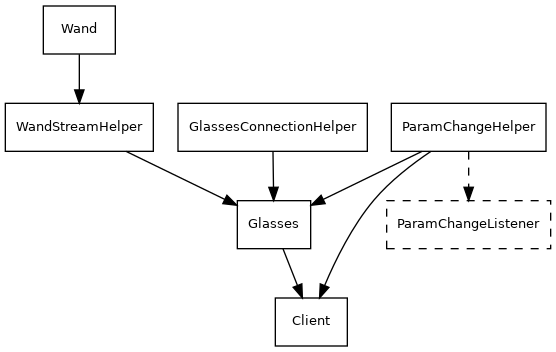
All of the functionality of the glasses can be accessed using only tiltfive::Client and tiltfive::Glasses, however many of the calls are blocking and/or require polling. To simplify access to the functionality, there are several additional helper classes to automate these operations.
| Helper | Purpose |
|---|---|
| tiltfive::WandStreamHelper | Monitor the wand event stream, and abstract access to tiltfive::Wand objects |
| tiltfive::GlassesConnectionHelper | Automate the exclusive connection process which requires repeated calling of tiltfive::Glasses::reserve() |
| tiltfive::ParamChangeHelper | Automate polling for changes to T5_ParamGlasses / T5_ParamSys and invoke callbacks on a tiltfive::ParamChangeListener subclasses |
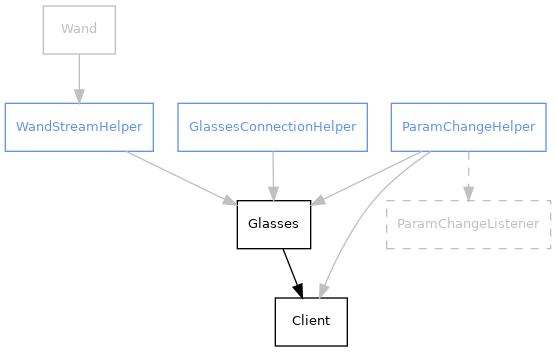
Simplistically, accessing the wand stream is done by configuring the stream (tiltfive::Glasses::configureWandStream()) and then repeatedly polling the stream (tiltfive::Glasses::readWandStream()).
To simplify this process, you can use a tiltfive::WandStreamHelper to automate the process and de-multiplex the stream into abstract tiltfive::Wand objects.
The tiltfive::WandStreamHelper automatically configures the stream to match the lifecycle of tiltfive::Wand objects - when no references are held, the stream is automatically stopped and restarted as needed.
Connecting the glasses is essentially a process of repeatedly calling tiltfive::Glasses::reserve() until an exclusive connection is established. If the glasses are not fully available (for example due to rebooting), you may receive a reservation for the glasses instead. To automate this process use a tiltfive::GlassesConnectionHelper.
or
(new in 1.2.0) After the GlassesConnectionHelper is destroyed, the Glasses object will remain in its current connection state. (This is a change from NDK 1.1.0, where the Glasses would be released on GlassesConnectionHelper destruction). The Glasses will still be automatically released when the Glasses object itself is destroyed.
Some of the parameters may change during operation (for example, the user want to adjust the IPD while using the glasses). To automatically detect changes and trigger a callback, use a tiltfive::ParamChangeHelper.
At this point you'll be able to receive callbacks for system-wide changes via tiltfive::ParamChangeListener::onSysParamChanged(). To also receive parameter changes for individual glasses:
 1.9.3
1.9.3